

Site inspections from a template, closed as a PDF to sign
Start a checklist from a template, say where on the site and which day, and answer each item: conforms, does not conform or N/A. A failed item takes a note and photos and can become a punch item in one step.
- Four templates ready to use
- Conforms, does not conform or N/A
- A failure becomes a punch item
The problem it solves
Inspections done on paper get lost between the site and the office, photos sit on a phone with no link to the item that failed, and the corrective work is not followed up. When the client or an inspector asks for the record, it is hard to find.
What it does
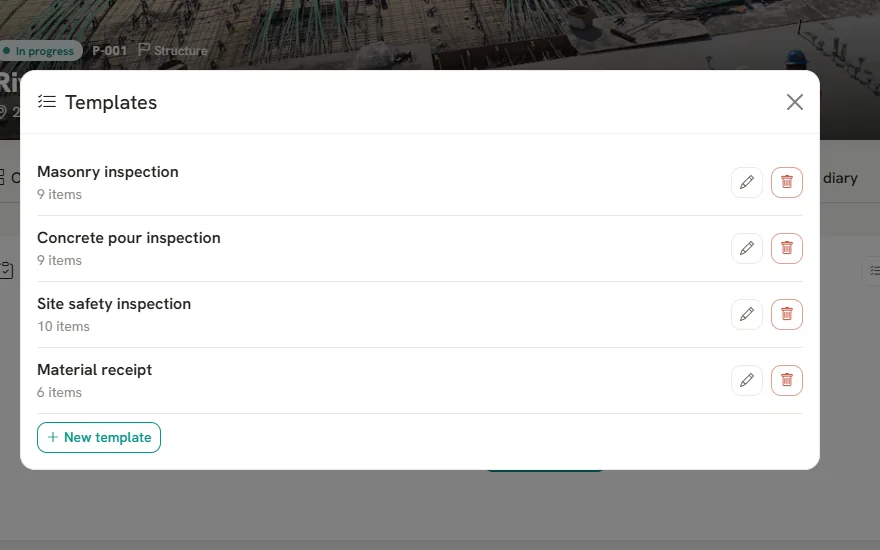
Four templates ready to use
Masonry inspection, concrete pour inspection, site safety inspection and material receipt come ready. Edit them or write your own: a name, then sections with one item per line.
Conforms, does not conform or N/A
Every item gets an answer, and a failed item opens for a note and photos, which are filed in the project’s Photos folder.
A failure becomes a punch item
From a failed item, create a punch item or a non-conformity with its corrective action. It lands numbered on the project’s board, linked to the item that failed.
A PDF with two signature lines
Every checklist downloads as a PDF: the project and the place, the totals, each section with its answers and notes, the photos, and lines for the inspector and the person responsible for the work.
Why it matters
A record that stays as it was
Once every item is answered you close the checklist and it becomes read-only. Reopening it needs permission to edit projects.
Better templates, same records
Each checklist keeps its own copy of the template, so improving a template leaves the inspections already filled in as they were.
The site as a map of inspections
Fill in the place the same way each time, such as block, floor and unit, and the list of checklists reads like a map of where the work was checked.
Frequently asked questions
Can we use our own inspection forms?
Yes. Edit the ready templates or create your own with a name and sections of items, one item per line. Checklists already filled in keep the version they were made with.
What happens when an item does not conform?
It opens for a note and photos, and from it you create a punch item or a non-conformity, numbered on the project’s board and linked to the item.
Can a checklist be signed?
Every checklist downloads as a PDF with two signature lines: one for whoever inspected and one for the person responsible for the work.
Tailored plans
Your proposal is built in the demo, based on the size of your operation.
More features of MotionHub Construction
- Punch items and RFIsNumbered punch items, RFIs and non-conformities with photo, responsible company and due date, pinned on the plan and logged on site even without signal.
- Kinds of card and workflowsRFI, punch item, non-conformity, safety observation: each kind with its own fields, numbering and status flow, drawn as a diagram with who may take each step.
- Site diaryThe daily site report with weather, crew, equipment, work done and photos, crew check-in from the phone, and a closed PDF ready to sign.
- Progress photosFixed photo points shot every week from the phone: slide through the dates of each point or compare two photos side by side.
- Projects on a mapEvery project on a map, in cards or in a list, with its status, phase, open tasks and documents waiting for approval.
- Project overviewOne page per project: phases and days left, what needs attention, the site, the client and the team, with every tool of the project one click away.
- Companies and contactsSubcontractors, suppliers, designers, clients and inspectors with their people, invited to each project with or without a licence, or sent documents by transmittal.
- Document registerFolders and versions per project, approval workflows, side-by-side revision comparison and transmittals with a record of who opened what.
- Document approvalsISO 19650 approval workflows and one My approvals queue with every document waiting for you, in every project, one click per step.
- Drawing registerEvery sheet with its number, title, discipline and revision, read from the title blocks of the PDFs, with the open punch items on each sheet.
- Drawing markup and commentsArrows, boxes, revision clouds, text, measures and areas to scale, and comments pinned on the drawing that the team replies to and resolves.
- 3D models and BIMIFC, GLB, STL and OBJ models opened in the browser, with sections, measures and comments, and versions and approvals like any document.
- Schedule (Gantt)A Gantt with dependencies, the critical path and a baseline. Change a duration and every date after it moves.
- Every activityEach activity says what it waits for, who does it and where, and its real progress: actual start, actual finish and percent done.
- Look-aheadThe next 2 to 6 weeks for the site meeting: what starts, what is late and who does it, as a PDF or a weekly email.
- DelaysEvery day the system checks the project’s records and suggests delays with their cause; you confirm them and see the days you can claim.
- Budget and cost reportThe budget by cost code, with subcontracts, purchase orders and bills against each line, and the forecast, variance and margin.
- Change ordersEvery change numbered, with its cost, its price to the client and the days it adds; once approved it moves the budget and the contract.
- Progress billingEach month’s measurement starts from the progress recorded on the schedule, with retention, and becomes an invoice with a due date.
- EquipmentMachines, tools and vehicles: which site each one is on, who has it, the next service and the rentals ending, with QR labels.
- Building assetsLifts, pumps, panels: every asset from purchase to handover, with what is still missing at each stage and a COBie export.
- PlacesThe project’s buildings, floors and rooms, set up once and shared by punch items, checklists, building assets and the schedule.
- Client reportA weekly report that prepares itself with progress, time, photos and the measurement. The client opens it on the phone, asks questions and approves the measurement.
- Handover and owner’s manualEvery unit with its owner and handover date, and an owner’s manual they open from a QR code, with documents, warranties and what to look after.
- Warranty requestsThe owner opens a request from the manual and follows it from a link; your team sees if it is in warranty, which system and which company answers.
See the solution in your company.
Guided demo and commercial terms set per company.