

Rent out your studio and take party bookings online
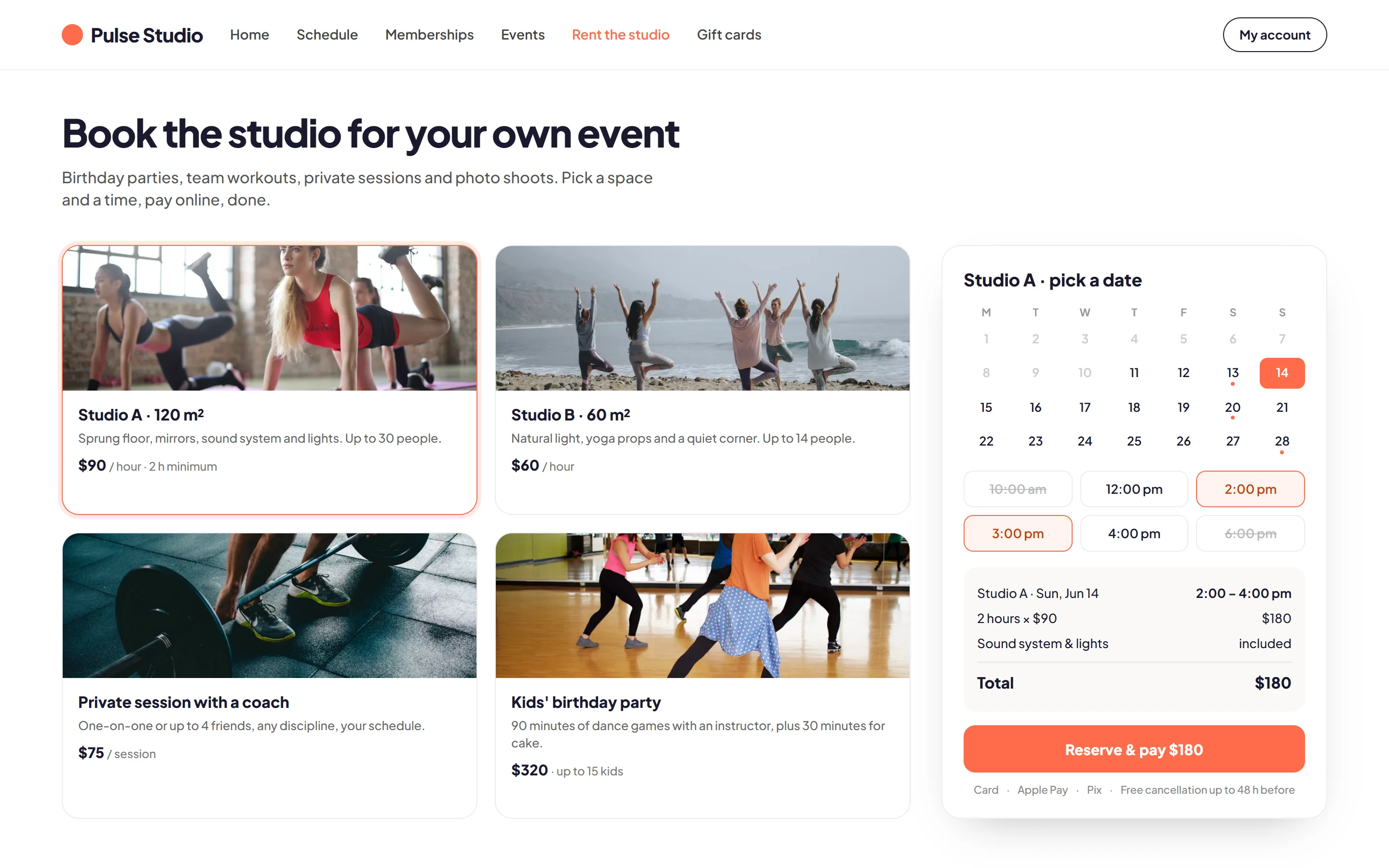
Set up each room rental, party or private session as a bookable service. Customers pick a date and an open time from your availability, add any extras, and pay when they book.
The problem it solves
Rental and party enquiries usually arrive as messages: which Saturday, for how long, how many guests, how much. Agreeing a time takes days of back-and-forth, and the slot stays uncertain until someone sends the money.
What it does
A bookable service for each offer
A room rental, a kids' party or a private session is a private session service with its own photo, description, price, length and group size.
Open times from your availability
Customers choose from the hours you make available. Add buffer minutes before and after each booking to reset the room, and set how far ahead people can book.
Lengths, extras and your own questions
Offer more than one length at different prices, sell add-ons with the booking, and ask the questions you need answered, such as the number of guests.
Booked and paid in one step
The booking form shows a price breakdown and takes the card payment as the booking is made, or lets customers pay at the desk if you allow it. Use it on your website or in your app.
Why it matters
Earn from quiet hours
Rent the room or host parties in the hours your class timetable leaves open, as another source of income for the studio.
No back-and-forth over a time
Customers see the open times and book one themselves, instead of a long message thread about which Saturday works.
Paid before the day
When customers pay at booking, the rental arrives on your calendar already paid, with the order in your records.
Frequently asked questions
Can customers book a studio rental online?
Yes. Create the rental as a private session service with its price and length. Customers pick a date and an open time on your website or app and pay by card when they book.
Can I charge different prices for longer bookings?
Yes. Add pricing tiers to the service, such as one hour and two hours at different prices. The customer picks the length in the booking form and sees the times and price change.
How do I leave time to reset the room between bookings?
Set buffer minutes before and after each booking in the service's booking policy, and the booking form keeps that gap clear around every booking.
Plans
Priced per location, with unlimited staff and services and no per-booking fees.
Loading plans…
More features of MotionHub Fitness
- Studio websiteA website builder tied to your live schedule, packages and booking, on your own domain, or booking added to the website you already have.
- Class schedulingRecurring classes, rooms, capacity, waitlists and instructor cover in one calendar, shown live on your website and app.
- Course and term enrollmentStudents enroll once in a course or term, every session is booked for them, and tuition is billed monthly or in full until the term ends.
- Online & hybrid classesLive online and hybrid classes with Zoom or Google Meet links created for each session, a start-as-host button for instructors, and class replays.
- Events & workshopsSell places at workshops, open houses and showcases, each with its own price, capacity, dates and spots-left count, and check people in at the door.
- Memberships & billingClass packs and recurring memberships with automatic renewals, follow-up on failed payments, pauses and membership changes, inside the rules you set.
- Gift cards & referralsSell studio gift cards online and at the desk, and reward members who bring a friend with credit they spend on packs and memberships.
- Retail & point of saleSell water, apparel and gear at the front desk and in an online shop, with stock counts, orders, pickup and shipping in the same system.
- Attendance & class rostersClass rosters with QR check-in, no-shows, waitlists and capacity, so you know who came to each class and how each pack was used.
- Waivers & agreementsDigital waivers, contracts and terms signed online at signup or before booking, with a signed PDF copy and re-signing when you change the text.
- Student self-service portalStudents book, cancel within your rules, buy packs, manage their membership, sign agreements and download invoices from their own account.
- Student communicationAutomatic booking messages you can edit, email campaigns to the right members, class messages and one inbox with AI-suggested replies.
- Challenges & rewardsAttendance challenges with badges, reward packages and a leaderboard that give members a reason to book their next class.
- Class feedbackMembers rate each class after it ends, so you know which classes and instructors to celebrate and what to fix.
- Reporting & dashboardsA dashboard you arrange yourself and reports on revenue, attendance and memberships, where each count opens the members behind it.
- AI insightsAI that reads your studio's own bookings, revenue and feedback and suggests what to do next, with the reasoning and the expected impact.
- Mobile appOne app under your brand: members book, pay and follow their progress, while staff check people in, sell and run the day from their phone.
- Task boardsRun the recital, the repairs and the follow-ups on boards your whole team can see, with owners, due dates and reminders.
- File sharingKeep studio files in one library, share them with an expiring link and get feedback drawn right on the poster or PDF.
- Business FinderFind suppliers, venues, partners and leads around your studio on a map, and keep each one in a register with its own steps.
- Instructor payPay instructors and event helpers each by their own rule, from pay per class to salaries, and get a pay report ready for payroll.
See the solution in your operation.
Free trial, guided demo and pricing in your local currency.