

Medical history forms patients fill in before they arrive.
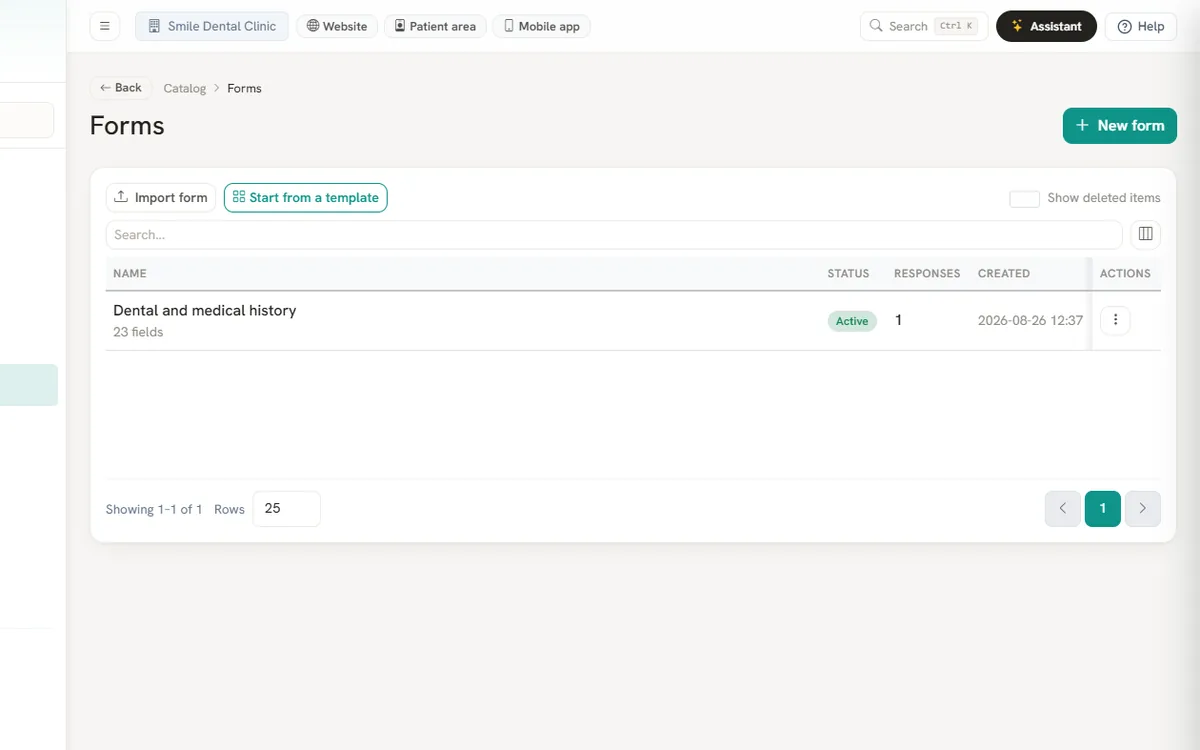
Send the patient a link to your medical history form before the visit. The answers stay on their record, and a button there turns allergies, conditions and medicines into health alerts the whole team sees.
- Forms the way you want them
- Sent before the visit
- Answers turned into health alerts
The problem it solves
A paper form filled in the waiting room delays the visit, is hard to read and often ends up in a drawer. Answers that matter, like an allergy to an anaesthetic or a blood thinner, stay on paper instead of in front of the dentist.
What it does
Forms the way you want them
Start from the ready dental and medical history form, or build your own with the questions your clinic asks.
Sent before the visit
Copy the link into a message, email it to the patient or fill it in with them at the desk. Patients answer on their own phone before they arrive.
Answers turned into health alerts
Fill from their latest form copies allergies, conditions and medicines into the record’s alerts. AI reads answers written in the patient’s own words and lists them for you to check.
Answers kept on the record
Each patient’s answers stay on their clinical record. A signed history keeps the PDF, the date, the time and the signer’s IP, and opening the answers is logged.
Why it matters
Less paperwork in the waiting room
The history is done before the patient sits down, so the visit starts with the patient, not with a clipboard.
Alerts in front of the dentist
Allergies and medicines appear in red on the record and on every visit, where the dentist looks before starting.
Your questions, your protocol
Ask what your clinic needs, from the ready dental history form to one you build yourself for a specialty.
Frequently asked questions
Can patients fill in their dental medical history online before the visit?
Yes. Send them the form link by email or copy it into a message. They answer on their phone, and the answers land on their record.
Do allergies from the form show up as alerts?
Yes. On the record, Fill from their latest form copies allergies, conditions and medicines into the health alerts. Answers in the patient’s own words are read by AI and shown for you to check before saving.
Can we use our own medical history questions?
Yes. Start from the ready dental and medical history form and change it, or build a form from scratch with your own questions.
Plans
Priced per location, with unlimited staff and services and no per-booking fees.
Loading plans…
More features of MotionHub Dental
- The visit with the dental chartCheck in, finish procedures on the dental chart with notes and photos, take payment and send work to the lab, from one screen.
- Patient recordContact and ID, health alerts, visits, prescriptions and certificates, files, treatment plans and balance due, on one page.
- 3D scans and CTIntraoral scans and CT scans opened in the browser on the patient’s record, to show and plan the treatment.
- X-ray reading with AIAI reads a panoramic X-ray, numbers the teeth and marks possible caries and other findings for the dentist to confirm.
- Schedule per dentist and roomEach dentist’s day and each room’s on one schedule, with online booking at any hour and a warning before two visits clash.
- Confirmations on WhatsAppA WhatsApp reminder for each visit with Confirm, Can’t make it and Reschedule buttons, and every answer back on the schedule.
- Treatments in progressEvery patient with an active treatment plan by specialty: last and next visit, who is late for a return and what they owe.
- Treatment plans and follow-upPlans built tooth by tooth, accepted in full or in part and signed on the phone, paid per procedure, and the ones still waiting for an answer.
- Smile simulationFrom one photo, a picture of how the patient’s smile may look after the plan, always labeled as a simulation and attached to the treatment plan.
- Receivables and installmentsWhat each patient still owes and how late, the installments coming up, and payment reminders that go out on their own.
- InsuranceInsurers and their price tables, and each claim from authorization to payment or disallowance.
- Clinic hour and pricingWhat an hour of the clinic costs and what each procedure really costs, compared with its price.
- Lab workEvery crown, bridge and denture from the impression to the fitting: what is late and what is ready to fit.
- Supplies and stockStock, purchases and stocktakes, and the materials kit each procedure uses up.
- Clinic dashboardToday’s visits, the patients, balances due and the revenue month by month.
See the solution in your practice.
Free trial, guided demo and pricing in your local currency.